M64Plus FZ Pro Emulator
- 4.8
- Rating
- 100.00K
- Installs
- $3.99
- Price
 Analysis by App-foxy
I spent time with M64Plus FZ Pro as an Android arcade emulator, and my first impression was that it is aimed at people who already know what they want from a Nintendo 64-style experience. It is not a casual arcade game you open for a quick round; it is a tool for running compatible software from a certain 64-bit console, with online cloud backup as one of its defining conveniences. That distinction matters because the quality of the experience depends not only on the app, but also on the games you use, your phone or tablet, your controller, and how much setup you are willing to handle.
Francisco Zurita is the developer behind this paid Pro edition. It costs $3.99, carries an Everyone age rating, and requires Android 6.0 or later. The app reached the store on February 22, 2020, and the current release is listed as version 3.0.332 (beta)-pro. With a 4.8 average from around 13 thousand ratings and over 100 thousand installs, it has clearly attracted a committed audience rather than being an obscure experiment.
What the emulator feels like in everyday use
The most important thing to understand is that this is an emulator, not a collection of included games. I would recommend it to someone who already owns or legally manages the software they want to play and is comfortable treating the app as the central part of a personal retro setup. If you expect to install it and immediately receive a ready-made library, this is the wrong expectation.
You May Also Like

 Blood Strike: 2.5 Anniversary
Blood Strike’s Loadouts Turn Every Drop Into a Tactical Gamble
A close look at Blood Strike’s custom loadouts: how fast access to signature weapons reshapes its battle royale rhythm, rewards preparation, and narrows the gap between fights.

 Pandora - Music & Podcasts
Pandora’s Music Is Easy to Start, but Harder to Recover
Pandora’s strength is its low-effort path from a seed to a station. Its weak spot is how much confidence it asks you to place in connection, setup, and quiet recovery.

 8 Ball Pool
8 Ball Pool Is Built on Rivalries, Rematches, and Routine
A close look at the rivalries, rematches, shared routines, and unanswered safety questions that turn a quick pool match into a persistent mobile community.

 Samsung Music
Samsung Music’s Quiet Strength Is Playing What You Already Own
Its reach comes less from spectacle than from dependable access to a personal library. That simplicity is both the app’s strongest retention engine and its ceiling.

 AccuWeather: Weather Radar
AccuWeather Review: A Quick, Clear Forecast for Everyday Decisions
For everyday plans, the best forecast is the one you can understand quickly. AccuWeather makes rain timing, radar, and local conditions easy to act on, with a few trade-offs.

 Hill Climb Racing
Why Hill Climb Racing Still Turns Crashes Into One More Run
A tiny car, a bumpy hill and one more upgrade: Hill Climb Racing keeps resurfacing because its simple chaos makes every near-miss feel personal.
More From Our News Desk



In ordinary use, the appeal is flexibility. A phone becomes a portable way to revisit console games, while a tablet can provide a larger screen for longer sessions. Touch controls make the app usable without extra hardware, but I found the experience much more convincing with a physical controller. Older console games often rely on precise movement, several buttons, and an analog stick, so a touchscreen layout can feel like a compromise even when the emulator itself is working properly.
The app’s cloud-backup focus is especially useful for people who move between devices. A short session on a phone can be continued later on a tablet without making the whole experience depend on one piece of hardware. I would still treat cloud backup as part of a broader save routine rather than as a reason to abandon every local copy. Before changing devices or clearing app storage, I would make sure an important save has synchronized and, where possible, keep a second copy of anything I would hate to lose.
That workflow is one of the less obvious strengths here. Cloud backup is not just a decorative extra if you play in different places. It can turn the emulator into a more practical travel companion: play during a commute, continue at home, and avoid manually moving files every time. The trade-off is that synchronization adds another step to think about. If you play offline, switch accounts, or move between devices without checking the backup state, convenience can become confusion.
Speed expectations depend on more than the app
I would not judge performance by the app’s download size or by the age of the original console alone. Emulation asks a modern device to reproduce the behavior of older hardware, and the result can vary with the phone, the game, the graphics workload, and the configuration. A recent device may feel effortless in one title while a less capable or older device may need more patience and adjustment.
For that reason, my speed expectation is best described as conditional rather than universal. M64Plus FZ Pro can be a smooth way to play when the device and chosen game are a good match, but the store rating should not be read as a promise that every title will perform identically on every Android device. The app supports Android 6.0 and later, yet minimum compatibility is not the same as a guarantee of ideal emulation speed.
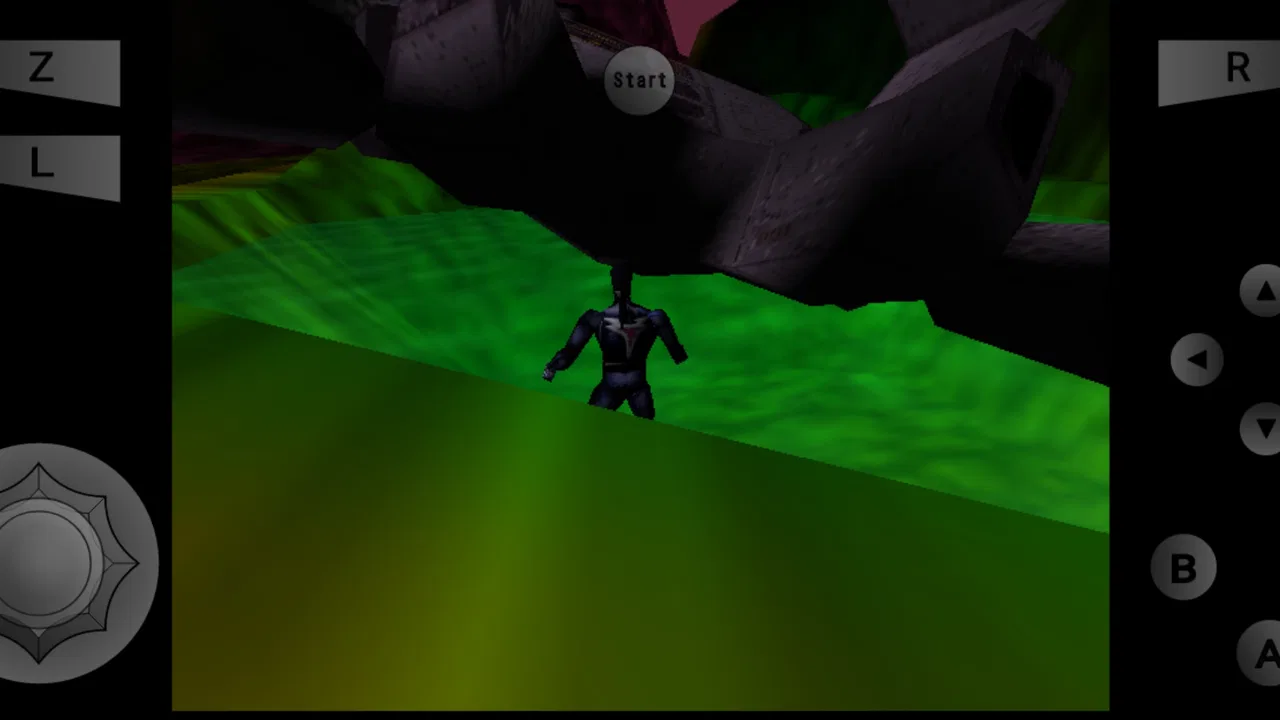
Touch response also affects the sense of speed. Even when the emulation is running acceptably, an on-screen analog stick can make movement feel less immediate than a real controller. This is why I separate technical performance from play comfort. A game may be running well while still feeling awkward because the virtual controls cover part of the screen or lack the physical feedback I expect from a console pad.
A useful test is to try a short, familiar section rather than judging the emulator from its menus. Choose a game you know well, play during a quiet moment, and pay attention to whether movement, sound, and image timing remain consistent. Familiarity makes small problems easier to notice. It also prevents a difficult game or an unfamiliar control scheme from being mistaken for an emulator issue.
What happens during longer or heavier sessions
Heavy use is where the difference between a convenient emulator and a frustrating one becomes clearer. Long sessions can expose heat, battery drain, background interruptions, or performance changes that are invisible during a five-minute test. I would not begin an important play session immediately after installing the app. First, I would load the intended game, test the controls, create a temporary save, and continue long enough to see whether the phone remains comfortable to hold.
The demanding moments are not necessarily the same for every game. Some software may place more pressure on graphics handling, while another may be more sensitive to timing or input. Because the app emulates a 64-bit console rather than running a simple native arcade title, it is reasonable to leave some headroom on the device. Closing unnecessary background apps and avoiding an already overheated phone can make the experience more predictable, even though those steps cannot turn weak hardware into a high-end gaming device.
Battery use is another practical consideration. A phone that handles ordinary apps comfortably may still lose charge faster during emulation, particularly when the screen is bright, audio is active, and a controller is connected. I would use a lower brightness level that remains comfortable and avoid judging the app’s efficiency from a single short session. The important question is whether the device remains stable and usable for the length of time you actually plan to play.
There is also a human factor during heavy use: save discipline. Cloud backup makes recovery more convenient, but I would not rely on it as an excuse to close the emulator immediately after a major achievement. Give the save process time to complete, especially before switching devices. A cautious routine—save in the game, wait briefly, then confirm the backup situation before leaving—reduces the risk of turning a good session into a recovery exercise.
Reliability, recovery, and the cost of a mistake
The app’s strongest reliability idea is the ability to keep saves available through online cloud backup. That matters because an emulator is often used on personal devices that get replaced, reset, or shared between a phone and a tablet. The feature makes the Pro edition more appealing than a setup that depends entirely on one local installation.
Still, reliability is more than whether a game launches. It includes whether you can recover after an interrupted session, whether your saves are where you expect them, and whether the controls remain usable after changing how you play. I would approach the first few sessions as a setup period. Test a save, leave the game, reopen it, and check that the progress returns correctly before investing hours in a long campaign.
This is also where the paid price becomes easier to evaluate. At $3.99, the app is not a major purchase, but it is still different from trying a free emulator first. I see the price as reasonable for someone who values the Pro edition’s cloud-backup workflow and intends to use it regularly. For someone who only wants to experiment with emulation once, the cost may feel less justified, particularly if they are uncertain about controller support, device performance, or the games they plan to run.
Recovery planning is especially important when moving from one Android device to another. I would not wipe the old device until I had opened the relevant game on the new one and confirmed that the expected progress was available. This is a simple habit, but it is more useful than assuming that a cloud feature automatically removes every possible transfer problem.
Another practical point is legal and personal responsibility. The emulator itself is the tool; it does not change the ownership status of the games you use with it. I would only use software and files that I have the right to use. That keeps the setup straightforward and avoids confusing the quality of the emulator with questions about where game files came from.
Device limits and the role of controls
The minimum Android requirement of 6.0 makes the app accessible to a broad range of devices, but I would not choose a phone solely because it meets that requirement. Older hardware may run the application while offering a less comfortable experience in demanding games. Available storage, thermal behavior, screen size, and controller options all matter more than the version number alone.
A small phone is convenient for travel, yet it can make virtual controls feel crowded. A larger display gives the buttons more room, but a tablet is less pocket-friendly and may not feel as natural for quick sessions. This is one area where there is no universal winner. If portability is your priority, touch controls may be acceptable. If accuracy and comfort matter more, I would budget for a compatible physical controller and make sure the device can hold it comfortably during extended play.
I would also avoid testing the emulator while the device is already busy with downloads, navigation, video calls, or other demanding tasks. That does not mean multitasking is impossible; it means that a clean test gives a fairer picture of what M64Plus FZ Pro can do on your hardware. If performance improves after closing background activity, the limitation may be the overall device workload rather than the emulator alone.
Storage planning is easy to overlook. The app is only one part of the setup, because your own game files and saves also need space. I would keep the library focused instead of copying everything to a phone at once. A smaller collection is easier to organize, easier to back up, and less likely to leave you searching through duplicate files when you simply want to play.
Compared with a handheld console, this approach offers convenience and flexibility but gives up some simplicity. A dedicated handheld usually starts faster, has physical controls built in, and avoids questions about phone notifications or battery sharing. M64Plus FZ Pro wins when you already carry an Android device and want one less piece of hardware. It loses if you want a completely self-contained retro machine with no setup decisions.
How it compares with other emulator choices
The usual alternatives fall into two groups: free emulator apps and dedicated retro hardware. A free app may be a sensible starting point for someone still deciding whether emulation fits their routine. It can reduce the initial cost and help you discover whether your device and controller feel right. The Pro edition becomes more compelling when cloud backup and a polished, repeatable setup matter enough to justify paying for the convenience.
Dedicated hardware has a different advantage. It normally provides a consistent screen, controls, and software environment, while this app depends on the Android device you choose. That dependence is also its main benefit: you can use a phone or tablet you already own, switch between devices, and avoid carrying another console. I would choose M64Plus FZ Pro over dedicated hardware for travel and flexibility, but I would choose dedicated hardware for a family room setup where immediate, controller-first simplicity matters.
Compared with playing through modern re-releases, emulation may offer a broader way to revisit older software, but it also asks you to manage files, controls, and saves yourself. A re-release is usually easier for a nontechnical player. M64Plus FZ Pro is better suited to someone who values the original platform experience and does not mind a little configuration before the fun begins.
The important trade-off is not simply free versus paid. It is convenience versus control. This app gives you a portable environment and cloud-oriented save handling, but it cannot remove every variable created by Android hardware, input methods, or the software you load. I would recommend it to a practical retro player, not to someone who wants every decision hidden behind a single launch button.
Who will enjoy it, and who should skip it
I think the best audience is an Android user who already has a personal library, wants to play away from a television, and values the ability to continue progress across devices. It also suits people who enjoy adjusting their setup until controls and performance feel right. The paid Pro edition makes the most sense when you expect regular use rather than a one-evening experiment.
A realistic everyday scenario would be a player who uses a phone during a trip, saves before putting the device away, and later resumes on a larger Android screen at home. In that situation, cloud backup can remove a tedious transfer step, while a controller can make the second session feel closer to the original console experience. The workflow is practical, but it rewards patience: test the save process first, keep the devices signed in as expected, and do not erase the old setup until the new one is confirmed.
I would tell a casual player to skip it if they do not already know which games they want to use, dislike configuring controls, or expect a guaranteed identical experience on every phone. I would also hesitate to recommend it for a very old or thermally limited device when the owner wants long sessions without monitoring heat or battery use. Meeting the Android requirement is a starting point, not a performance promise.
Parents should also note the Everyone rating while remembering that the age label describes the app’s content rating, not every game that a user might choose to run. The app itself is presented for a general audience, but the broader library connected to an emulator can vary. That makes it worth supervising the game files and the way younger players use the device.
My performance verdict
My overall view is positive, with a clear condition: M64Plus FZ Pro is strongest when treated as a serious portable emulation setup rather than a plug-and-play arcade download. Its useful combination is the Android requirement, the Pro purchase, and online cloud backup, especially for players who move between devices. The 4.8 average and roughly 100 thousand installs suggest that many users find the approach worthwhile, although those figures should not replace testing it on your own hardware.
In terms of speed, I would expect the experience to be good when the device has enough headroom and the game is a suitable match, but I would not promise uniform results. During heavy use, watch comfort, battery behavior, and consistency rather than focusing only on whether a game starts. For reliability, build a small save-and-recovery routine before trusting the setup with long progress. Those habits make a bigger difference than simply installing the app and hoping everything will take care of itself.
The $3.99 price feels fair for a regular retro player who specifically wants this Pro workflow. It is less attractive for someone who is only curious about emulation or who prefers the simplicity of dedicated hardware. My recommendation is therefore straightforward: choose it if you want your Android phone or tablet to become a flexible Nintendo 64-style gaming device and you are willing to manage the practical details. For the right player, the real advantage is not just running old games; it is making that library portable and recoverable.
FAQs for M64Plus FZ Pro Emulator
01What is M64Plus FZ Pro Emulator, and what devices does it support?
M64Plus FZ Pro Emulator is an Android application designed to run Nintendo 64 games on compatible mobile devices. It supports many Android phones and tablets, although performance depends on the processor, graphics hardware, Android version, and the specific game being played. It is not an official Nintendo product, and users must provide their own legally obtained game files.
02Does M64Plus FZ Pro Emulator include Nintendo 64 games?
No. The emulator does not normally include copyrighted Nintendo 64 games, BIOS files, or downloadable game content. You need to obtain game ROM files from sources you are legally allowed to use and then load them into the application. Downloading copyrighted ROMs from unauthorized websites may violate copyright law, even if you own the original cartridge, depending on your local regulations.
03What are the main advantages of the Pro version compared with the free version?
The Pro version is intended for users who want a more complete M64Plus FZ experience and may include additional features, improved customization, or fewer limitations than the free edition. It is particularly useful for players who regularly adjust graphics settings, use multiple controller layouts, or want access to advanced emulator options. Exact features can vary by app version, so checking the current store listing is recommended.
04Can I use a Bluetooth controller with M64Plus FZ Pro Emulator?
Yes, the emulator generally supports external gamepads, including many Bluetooth controllers, which can provide a more comfortable experience than touchscreen controls. After pairing the controller with your Android device, you can configure buttons inside the emulator’s input settings. Compatibility and button mapping may differ between controller models, and some devices may require manual configuration or additional permissions.
05Why might some games run slowly, display graphical glitches, or crash?
Nintendo 64 emulation is demanding, and not every game behaves perfectly on every Android device. Performance can be affected by the phone’s chipset, emulator graphics plugin, resolution settings, frame-rate options, and game-specific compatibility. If a title has problems, try another graphics profile, reduce the rendering resolution, disable demanding enhancements, or consult the emulator’s compatibility information before assuming the application is faulty.
Pros
- Excellent Nintendo 64 compatibility across a wide range of games.
- Supports save states
- cheats
- and customizable on-screen controls.
- Offers multiple video plugins and graphics settings for fine-tuning.
- Bluetooth controller support makes longer sessions more comfortable.
- Pro version removes ads and includes additional emulator features.
Cons
- Some games may require per-title settings to run correctly.
- Performance can vary significantly between Android devices.
- Setup menus may feel overwhelming for first-time emulator users.
- Requires legally obtained ROM files; games are not included.
- Certain graphics enhancements can cause glitches or increased battery use.

M64Plus FZ Pro Emulator
Gallery